
Fiber Picker
The Fiber Picker is the sheet that opens whenever the app asks you to choose fibers. You’ll see it when you build a pattern’s floss list, add a fiber to your Shopping List, or choose fibers to substitute or add on a project.
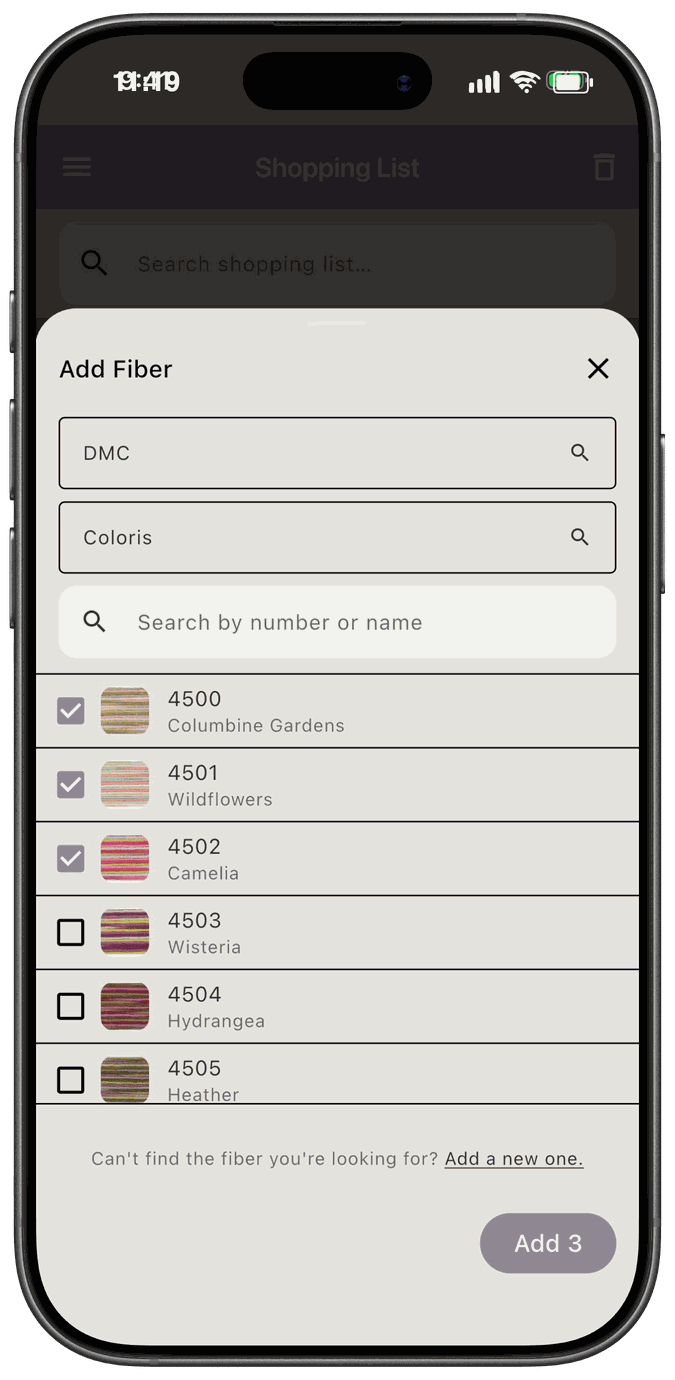
Find a fiber
Section titled “Find a fiber”- Start typing in the brand field at the top, which reads Select brand until you choose one, and pick a brand from the list.
- Do the same in the collection field, which reads Select collection.
- Type in Search by number or name to narrow the list of fibers.
Pick one fiber or several
Section titled “Pick one fiber or several”The picker works in one of two ways, depending on where you opened it.
- Pick several. Check each fiber you want. The button at the bottom reads Add Selected until you’ve checked something, and then Add with the number you’ve checked, like Add 3. Tap it to add them all.
- Pick one. Tap a fiber, and the picker hands it back right away. There’s no button to tap.
Tap the x at the top to close the picker without choosing anything.
If a fiber isn’t in the list
Section titled “If a fiber isn’t in the list”At the bottom of the picker, Can’t find the fiber you’re looking for? Add a new one. lets you add the fiber yourself. See Key Concepts for how your own additions work.
Fibers you can’t choose
Section titled “Fibers you can’t choose”If a fiber can’t be chosen where you opened the picker, it shows That fiber can’t be used here. For example, in the Add Fiber dialog in Manage Fibers, fibers that are already on the project are grayed out.
Where the Fiber Picker opens
Section titled “Where the Fiber Picker opens”- A pattern’s floss list. Tap Add Fiber in the floss list editor, and pick several. See Pattern Stash.
- The Shopping List. Choose Fiber as the Item type when you add to the list, and pick several. See Manually Adding Items.
- A project’s substitutes. Tap Add sub when you create a project or in Manage Fibers, and pick several. See Fiber Substitution.
- The Add Fiber dialog in Manage Fibers. Pick one fiber for the original and, if you like, one for the substitution. See Fiber Substitution.